How it works
You stay in the loop without having to do it all. Here’s how a visit with Odhor unfolds, moment by moment.
The four moments, in detail
What you do, what we do and what you see in the app, at every moment.

You book
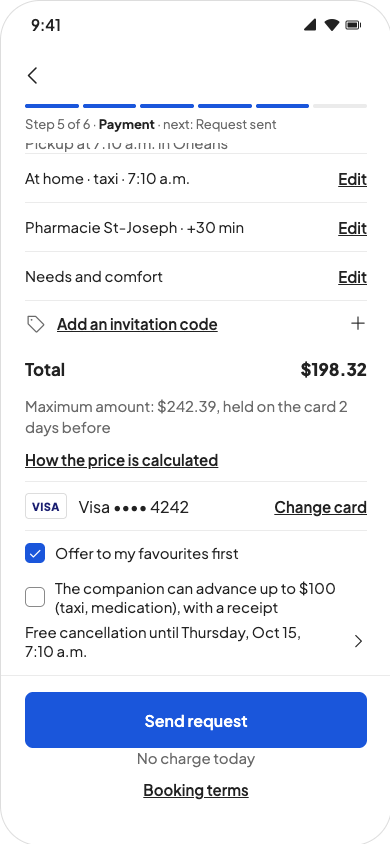
You book for yourself or for a loved one. For a loved one, they give their own consent, point by point, from a link sent by text: saying no to one point doesn’t stop the visit. They don’t need a smartphone; reminders reach them by text message. Before you confirm, a summary covers everything: the place, the pickup time, your options and how long you can cancel for free.
We choose
The app first suggests the companion who fits best: close to home, speaking your loved one’s language and trained for their needs, a walker for example. Prefer someone else? You can choose from the available companions, at the same price. Once they’re assigned, message them what matters: the side door, the doorbell that doesn’t work, the cat who slips outside.
On the day
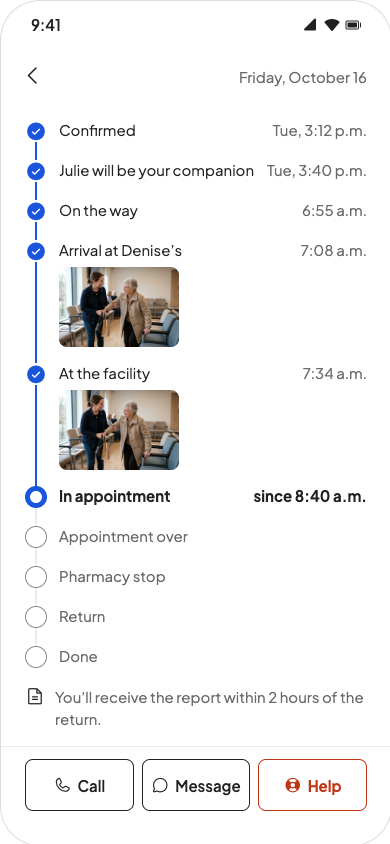
During the visit, a card in the app follows its main steps: on the way, arrived, at the facility, appointment done, heading home. If your loved one agreed, you also see where they are during the trip. Appointment running long? Your companion asks you for 30 more minutes, and you’re the one who says yes or no. The rest of the time, there’s nothing for you to do: you just watch the visit move along.
The report
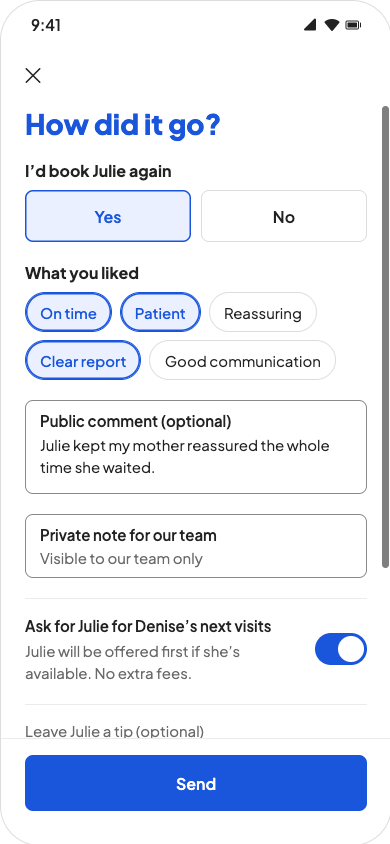
The report shows the actual times, the amount and receipts for anything advanced. Does an expense look wrong? You can dispute it until the companion is paid. Then just one question: would you call on this companion again? If yes, ask for them for future visits, and leave a tip if you feel like it.
You book
You book for yourself or for a loved one. For a loved one, they give their own consent, point by point, from a link sent by text: saying no to one point doesn’t stop the visit. They don’t need a smartphone; reminders reach them by text message. Before you confirm, a summary covers everything: the place, the pickup time, your options and how long you can cancel for free.
We choose
The app first suggests the companion who fits best: close to home, speaking your loved one’s language and trained for their needs, a walker for example. Prefer someone else? You can choose from the available companions, at the same price. Once they’re assigned, message them what matters: the side door, the doorbell that doesn’t work, the cat who slips outside.
On the day
During the visit, a card in the app follows its main steps: on the way, arrived, at the facility, appointment done, heading home. If your loved one agreed, you also see where they are during the trip. Appointment running long? Your companion asks you for 30 more minutes, and you’re the one who says yes or no. The rest of the time, there’s nothing for you to do: you just watch the visit move along.
The report
The report shows the actual times, the amount and receipts for anything advanced. Does an expense look wrong? You can dispute it until the companion is paid. Then just one question: would you call on this companion again? If yes, ask for them for future visits, and leave a tip if you feel like it.
A visit, from start to finish
Just under two minutes to see these four moments, with the app’s real screens.
All that’s left is to pick the date.
Now you know how it all works. The rest, your companion takes care of with you.
Another question?All our answers are in Help and questions.